
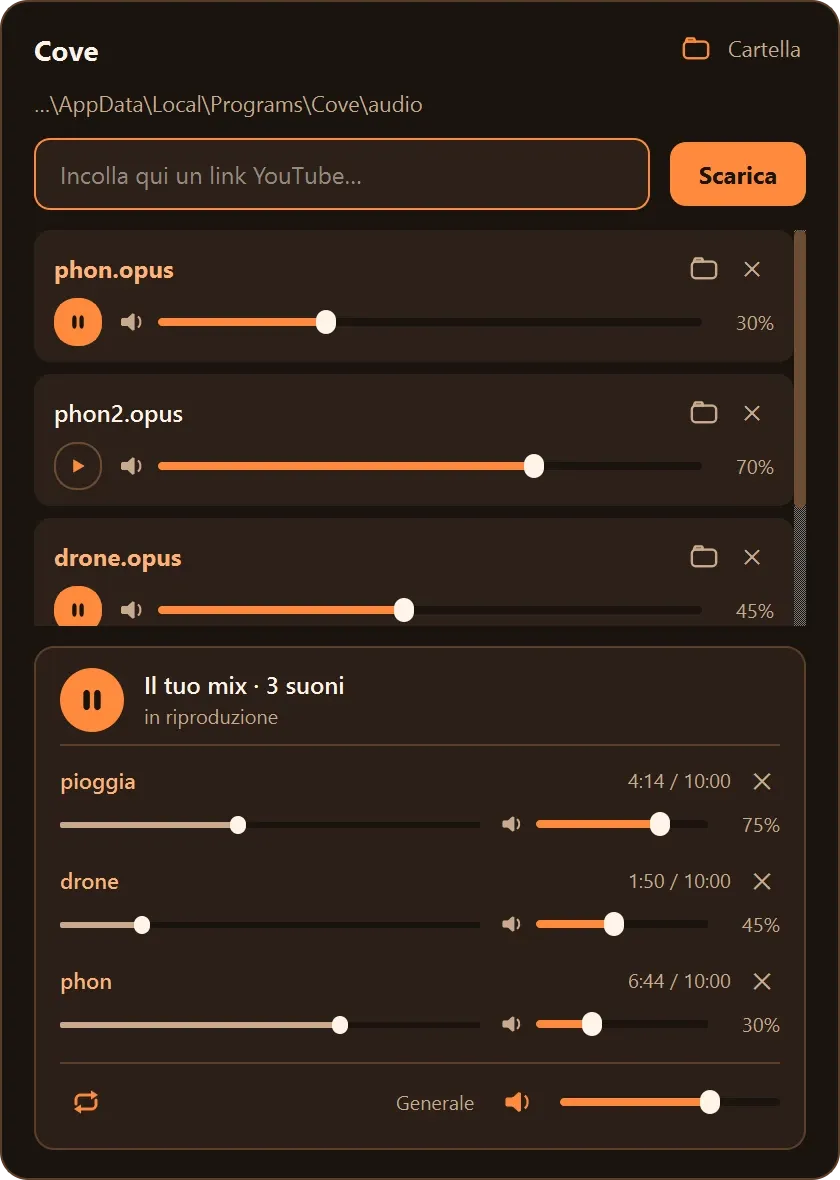
Tray panel
A click on the tray icon opens a panel in the corner of the screen; there is nothing else to open.
To have white noise or rain while working, I had to keep the video open in a browser tab, with ads and interruptions.
It downloads the audio once, at its original quality, and plays it from a small panel in the system tray, also with the media keys. Several sounds can play together, each with its own volume.
01 — Overview
Cove downloads audio at the best available quality and plays it from a small panel that slides out of the system tray. It is meant for focus audio such as white noise, rain or ambient music, and mixes several sounds: rain over a drone, white noise under music.
A click on the tray icon opens a panel in the corner of the screen; there is nothing else to open.
Audio is kept in its original format (Opus), without being converted again. A link copied to the clipboard is offered when the panel opens.
Every sound has its own play button and volume, and several play at once. The mix has a strip for each sound, with progress and volume, and comes back paused the next time Cove starts.
The play and pause keys of keyboards and headphones control the mix from anywhere. Cove also shows up in the media controls of Windows and of Linux desktops.
Every downloaded file stays available in the panel, next to four built-in sounds: two kinds of white noise, a drone and rain.
The downloader, yt-dlp, updates itself, so a change on YouTube's side doesn't need a new version of Cove.
02 — Details
Windows 10 or 11, 64-bit, with an installer that does not need administrator rights. Linux x86_64 with glibc 2.34 or newer, as an AppImage, and a system tray; GNOME needs the AppIndicator extension.
Both include everything Cove needs, Python too, which is why they are larger than the others. The interface is in Italian.
Projects
 Orbit
 Pulse
 Prism
 Argus
 Inlay